How does Instant Booking work?
The instant booking feature allows customers to book your trip immediately, without waiting for confirmation from you. This is useful if you have guaranteed spots available.
When you turn on Instant Booking for your listings you will immediately benefit from it in multiple ways. And it's just a few clicks.
No more expired holding time
Let your guests finalize their booking whenever they are ready. You don't have to set Holding time or extend when it expires. Save yourself time and the hassle of extending it.
Did you know that the conversion rate from inquiry to booking is double for listings with instantly bookable spots?
You won't lose the personal touch
Your future guests will still be able to send you an inquiry when they are not ready to book yet. What will make the difference is that the guests don't have to wait for you to manually send them the available message, they will be able to book whenever they are ready.
How to turn on Instant Bookings?
First, go to the Listing menu, then find the Packages & Availability button on each listing.
Easiest way to turn it on:
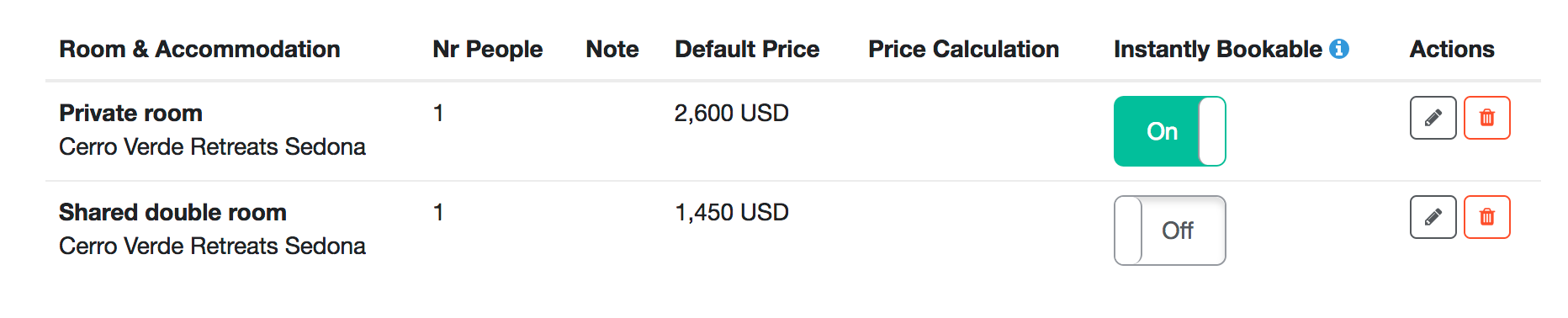
With just a click you can add one instantly bookable spot to each future date per package. You can just toggle it On/Off in the room list. When you turn it Off then all the future dates will be bookable per request and within the Holding time.
Have more control and add more spots:
If you'd like to edit the packages manually or add more than 1 instantly bookable spot then scroll down to the calendar and select the dates you would like to make instantly bookable. You will see the Update Availability widget on the right.
- Select arrival dates of the package you'd like to edit
- Change the availability to Instantly bookable
- Select the number of slots the guests can book instantly
- Apply it to the selected dates.
- When you have switched all the dates, save it to confirm your changes.
The instantly bookable dates will appear in green.

Tips for success
- When Instant Booking has been turned on, your guests will be able to book your retreats and tours instantly. Make sure to keep your calendar and availability settings up-to-date.
- Cancelling disrupts guests’ plans. Keep your guests happy and make sure you don't have to cancel just because your calendar is inaccurate. Don’t add Instantly bookable spots to a date for which you are not sure you have spots.
- When an instant spot is booked, please remove it from the availability calendar.
- Get ready for more inquiries and reservations - make sure you can respond to the incoming requests and questions within 24 hours!